Candidate screening strategies
With your requirements clearly defined, the next step is creating a focused list of candidate models. Rather than evaluating hundreds of available models, use strategic screening techniques to identify the most promising options.
The screening challenge
The embedding model landscape includes hundreds of options with new models released regularly. Evaluating every model would be impractical and time-consuming. Instead, use proven heuristics to quickly identify candidates worth detailed evaluation.
Strategic screening heuristics
1. Filter by modality support
This is your first and most critical filter. Models can only work with the data types they're designed for.
Examples:
- Text-only models (e.g., Snowflake Arctic): Cannot process images or audio
- Multimodal models (e.g., Cohere
embed-v4.0, Googlegemini-embedding-2): Support text + other modalities.gemini-embedding-2covers text, images, PDFs and audio. Cohere's Embed generation embeds text and images into a shared space - Vision models (e.g., ColPali): Designed specifically for document images
- Audio models: Specialized for speech and sound processing
No matter how excellent a model's performance, a text-only model cannot handle image retrieval, and a vision-only model cannot process plain text queries.
2. Prioritize existing organizational assets
Models your organization already uses offer significant advantages:
Already deployed models:
- Proven evaluation and approval processes
- Existing infrastructure and billing
- Known performance characteristics
- Established operational procedures
Provider ecosystem models: If you use services from providers like:
- Cohere, Mistral, OpenAI: Check their embedding model offerings
- AWS, Azure, Google Cloud: Explore their model catalogs
- Existing ML platforms: See what models are readily available
These models often have simplified procurement, billing, and integration processes.
3. Consider well-established models
Popular models are generally popular for good reasons:
Well-known models:
| Provider | Model Families |
|---|---|
| Alibaba | gte, Qwen |
| Cohere | embed |
gemini-embedding | |
| Jina AI | jina-embeddings |
| Mistral | mistral-embed |
| NVIDIA | NV-embed |
| OpenAI | text-embedding |
| Snowflake | arctic-embed |
| Voyage AI | voyage |
| Weaviate | Weaviate Embeddings |
Other model families:
- ColPali: Leading models for document image embeddings
- CLIP/SigLIP: Multimodal (text + image) embeddings
- nomic, bge, MiniLM: Well-regarded text retrieval models
If you are running Weaviate, the practical shortcut is that most of these families are reachable through a model provider integration, so switching candidates is usually a collection-configuration change rather than an application rewrite. Weaviate Embeddings is the first-party option, served from Weaviate Cloud with no separate provider account.
Well-established models typically offer:
- Comprehensive documentation and examples
- Active community support and discussions
- Wide integration support across platforms
- Proven track records across use cases
4. Review benchmark leaders
Standard benchmarks help identify high-performing models, but use them strategically.
MTEB (Massive Text Embedding Benchmark) filtering:
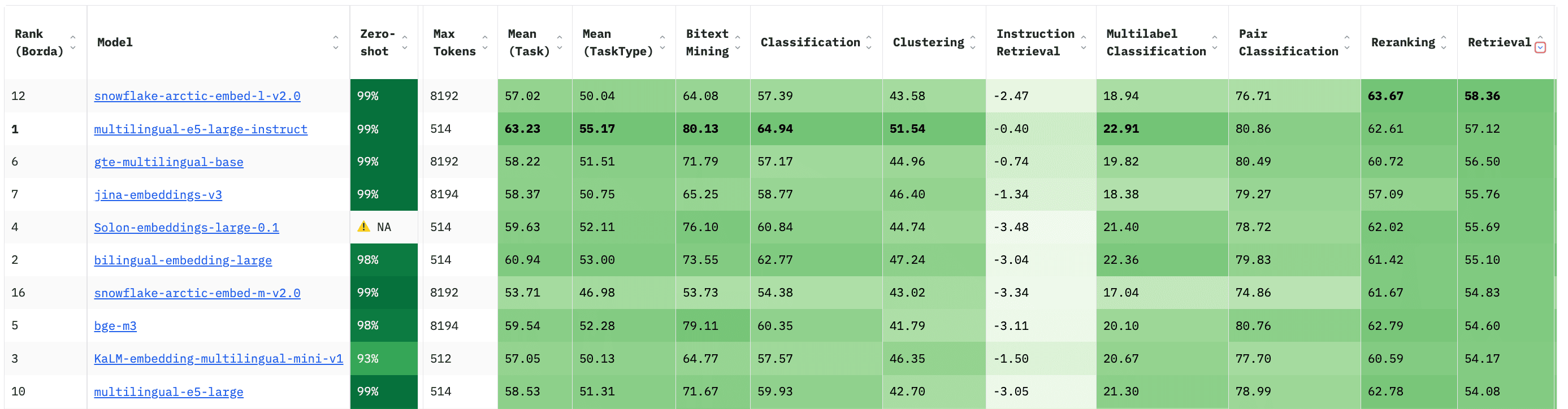
This view is filtered to smaller models and sorted by retrieval performance. Families that surface near the top include:
- Snowflake Arctic models
- Alibaba GTE models
- BAAI BGE models
- Microsoft multilingual-e5 models
- JinaAI embedding models
The leaderboard is a live, third-party resource, so treat any screenshot in this course as a dated snapshot rather than a current ranking. Check MTEB yourself before you shortlist.
Specialized benchmarks:
For image retrieval tasks, use MIEB (Massive Image Embedding Benchmark):
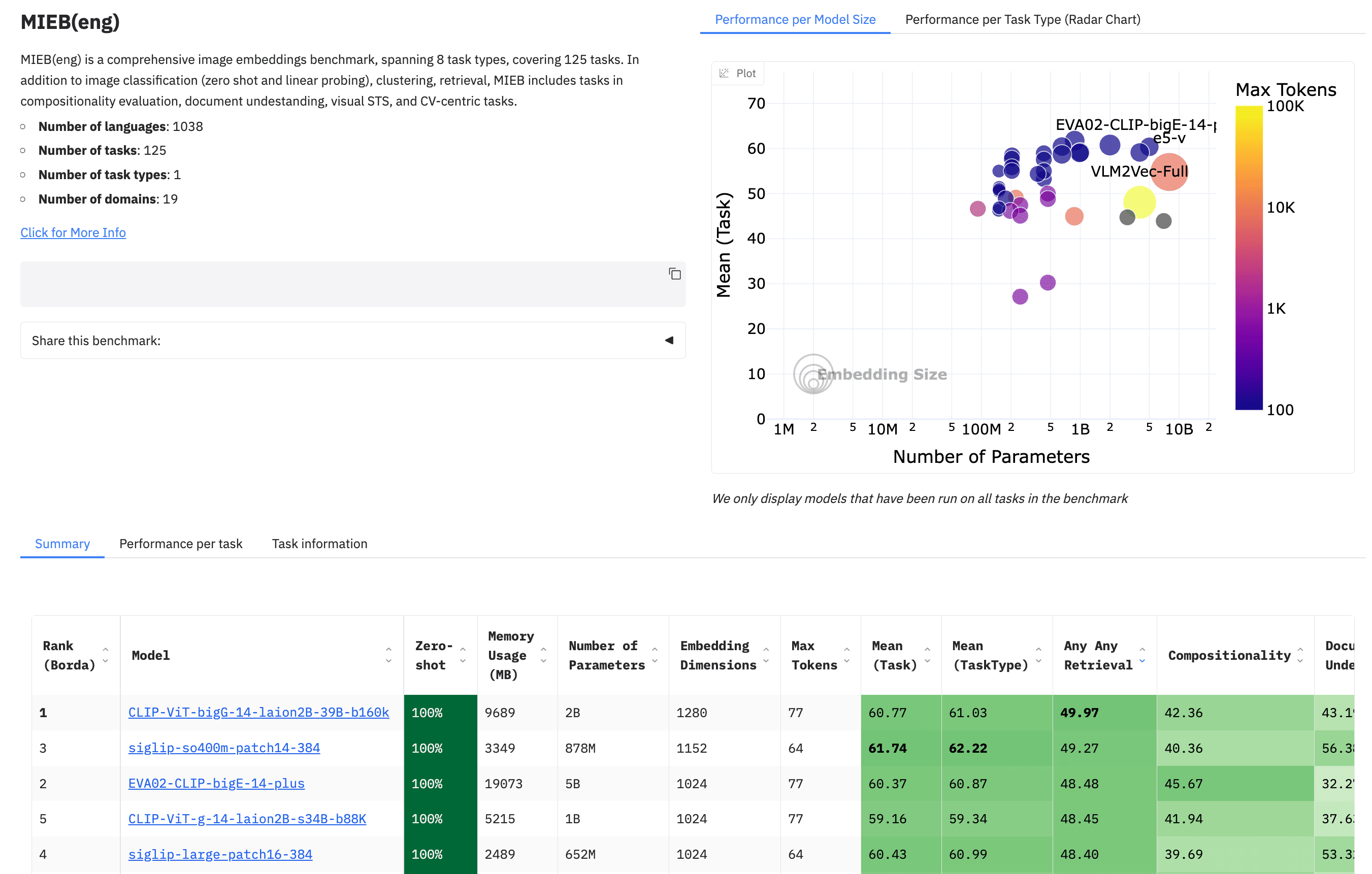
Benchmark filtering tips:
- Filter by relevant metrics for your use case
- Consider model size constraints (parameters, memory)
- Look for models that balance performance with practical constraints
- Cross-reference with your modality and language requirements
Building your candidate list
Practical screening process
- Start with modality: Filter for models supporting your required data types
- Add existing assets: Include models already available in your organization
- Research popular options: Add 3-5 well-known models in your domain
- Check benchmarks: Include 2-3 benchmark leaders that meet your constraints
- Limit scope: Aim for 5-10 total candidates for detailed evaluation
Example screening results
For a text retrieval application requiring multilingual support with moderate latency requirements:
Candidate list might include:
- Existing:
text-embedding-3-small(if already using OpenAI). This is also the model Weaviate defaults to for OpenAI.text-embedding-ada-002still works, but it is the previous generation and is not the model to start a new evaluation on - Popular:
snowflake-arctic-embed-l-v2.0(balanced performance/size, multilingual) - Benchmark candidate:
intfloat/multilingual-e5-large(widely used multilingual baseline). Note that in the leaderboard screenshot above it ranks tenth of the ten rows shown, which is exactly why a benchmark name alone is not a recommendation - Provider option:
embed-multilingual-v3.0(if using Cohere). This is Weaviate's default for that provider.embed-v4.0is the current generation - Specialized:
gte-large-en-v1.5(strong English performance)
This focused list balances proven options, high performance, and practical constraints.
Avoiding common pitfalls
Don't:
- Include every model that looks interesting
- Focus only on benchmark scores without considering practical constraints
- Ignore licensing or deployment requirements during screening
- Select models that exceed your hardware or budget constraints
Do:
- Maintain a manageable candidate list (5-10 models)
- Consider the full context of your requirements
- Include at least one "safe" option (established, proven model)
- Document why each model was selected for evaluation
With your candidate list compiled, you're ready for detailed evaluation. We'll explore how to design comprehensive evaluations using your own data and requirements to make the final selection.