Understanding the ingestion pipeline
Understanding what happens during ingestion helps you make informed decisions about performance, resource usage, and data management.
Weaviate includes APIs for single-object ingestion, many-object (single request) ingestion, and bulk ingestion. Regardless of the method, the underlying ingestion process is similar.
Data ingestion components
When an object is added to Weaviate, multiple parts of the database instance are affected, including the object store, vector index and inverted indexes.
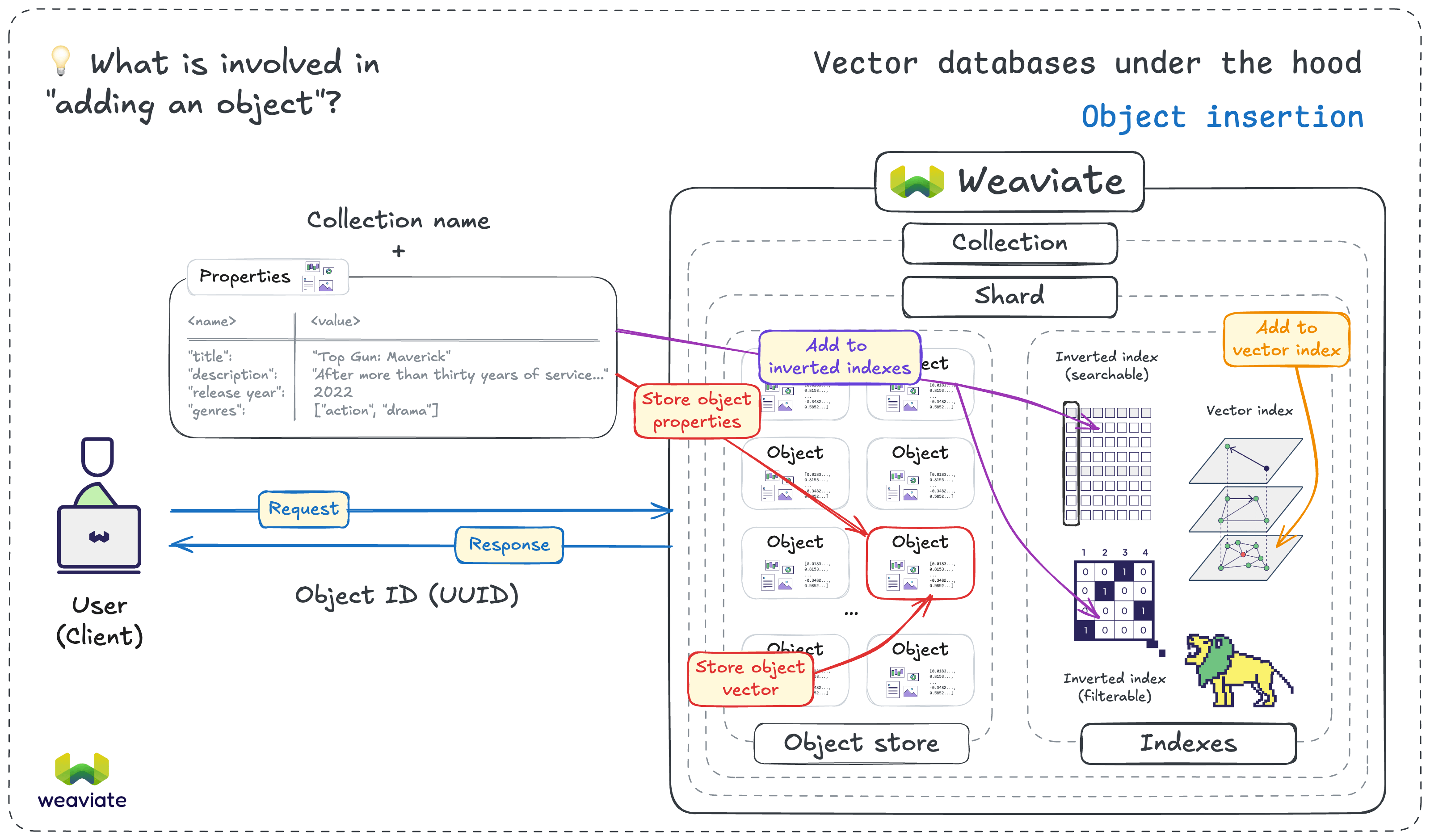
When you add data to Weaviate, it affects several components. Here are some of the main components involved:
- User/Client: Your application sends data via the Python client
- API request/response: Weaviate's REST/gRPC API receives and validates the request; it ultimately sends a response back to the client
- Vectorization: A vector may be generated if needed
- Object Store: The object and its vector are stored
- Index Updates: Both a vector index and inverted index are updated to reflect the new data
When vectorization occurs
There are two main approaches to vectorization when adding data to Weaviate. They are to use an integrated vectorizer or to pre-compute vectors before ingestion.
- Integrated Vectorizer
- Precomputed Vectors
Weaviate-integrated vectorizer (e.g., text2vec-openai, text2vec-cohere):
- Weaviate handles vectorization automatically
- Simplifies your code
- Adds vectorization latency during ingestion
- may incur vectorization costs per object
import weaviate
from weaviate.classes.config import Configure, Property, DataType
import os

client = weaviate.connect_to_weaviate_cloud(
    cluster_url=os.getenv("WEAVIATE_URL"),
    auth_credentials=os.getenv("WEAVIATE_API_KEY"),
    headers={"X-OpenAI-Api-Key": os.getenv("OPENAI_API_KEY")}
)

# Create collection with integrated vectorizer
movies = client.collections.create(
    name="Movies",
    properties=[
        Property(name="title", data_type=DataType.TEXT),
        Property(name="overview", data_type=DataType.TEXT)
    ],
    vector_config=Configure.Vectors.text2vec_openai(model="text-embedding-3-small")
)

# Add object - Weaviate handles vectorization
movies.data.insert({
    "title": "The Matrix",
    "overview": "A computer hacker learns about the true nature of reality."
})

client.close()

Pre-computed vectors:
- You generate vectors before sending to Weaviate
- Faster ingestion (no vectorization during import)
- More control over the vectorization process
- Can batch vectorization separately
import weaviate
from weaviate.classes.config import Configure, Property, DataType
from openai import OpenAI
import os

# Generate vectors yourself
openai_client = OpenAI()

def get_embedding(text):
    response = openai_client.embeddings.create(
        model="text-embedding-3-small",
        input=text
    )
    return response.data[0].embedding

# Connect to Weaviate
client = weaviate.connect_to_weaviate_cloud(
    cluster_url=os.getenv("WEAVIATE_URL"),
    auth_credentials=os.getenv("WEAVIATE_API_KEY")
)

# Remove the collection created in the previous example, if it exists
client.collections.delete("Movies")

movies = client.collections.create(
    name="Movies",
    properties=[
        Property(name="title", data_type=DataType.TEXT),
        Property(name="overview", data_type=DataType.TEXT)
    ],
    vector_config=Configure.Vectors.self_provided()
)

# Pre-compute vector and send to Weaviate
text = "The Matrix - A computer hacker learns about the true nature of reality."
vector = get_embedding(text)  # Generate or retrieve a vector outside Weaviate

movies.data.insert(
    properties={
        "title": "The Matrix",
        "overview": "A computer hacker learns about the true nature of reality."
    },
    vector=vector
)

client.close()
For most users, an integrated vectorizer is the best choice due to its simplicity. However, consider pre-computed vectors if you:
- have a custom model or vectorization process, use a
self-providedvectorizer and provide pre-computed vectors. - are migrating an existing dataset with pre-computed vectors, configure the appropriate vectorizer and provide pre-computed vectors.
What gets indexed
Every object added to Weaviate gets indexed to speed up search and filtering:
-
Vector index: For semantic/similarity search
- Stores vector embeddings
- Enables nearest neighbor queries
-
Inverted indexes: For keyword search (BM25) and filtering
- Tokenizes text properties
- Enables fast keyword searches
- Enables fast filtering by property values
When objects become searchable
Objects are searchable after they are added to the relevant index.
If asynchronous vector indexing is enabled, there may be a delay between when an object is added and when it becomes searchable. In this case, the object is stored and a response is sent back to the client, but the vectorization and indexing happen in the background.
UUIDs and their role
Each object in Weaviate is identified by its own UUID (Universally Unique Identifier), which is unique in each collection. UUIDs serve several critical purposes of deduplication, idempotency, and updates.
We will cover UUID strategies in more detail later in this course.
import weaviate
from weaviate.util import generate_uuid5
import os

client = weaviate.connect_to_weaviate_cloud(
    cluster_url=os.getenv("WEAVIATE_URL"),
    auth_credentials=os.getenv("WEAVIATE_API_KEY")
)

movies = client.collections.use("Movies")

# Auto-generated UUID (different each time)
movies.data.insert({
    "title": "The Matrix",
    "overview": "A computer hacker learns about reality."
})

# Deterministic UUID (same for same input)
uuid = generate_uuid5("the-matrix-1999")
movies.data.insert(
    properties={
        "title": "The Matrix",
        "overview": "A computer hacker learns about reality."
    },
    uuid=uuid
)

# Update existing object using same UUID
movies.data.update(
    properties={
        "title": "The Matrix",
        "overview": "Updated overview text."
    },
    uuid=uuid
)

client.close()
Now that you understand the ingestion pipeline, let's learn how to prepare and validate your data before ingestion.