Comparing search types
Recall that Weaviate supports three types of searches: vector, keyword, and hybrid.
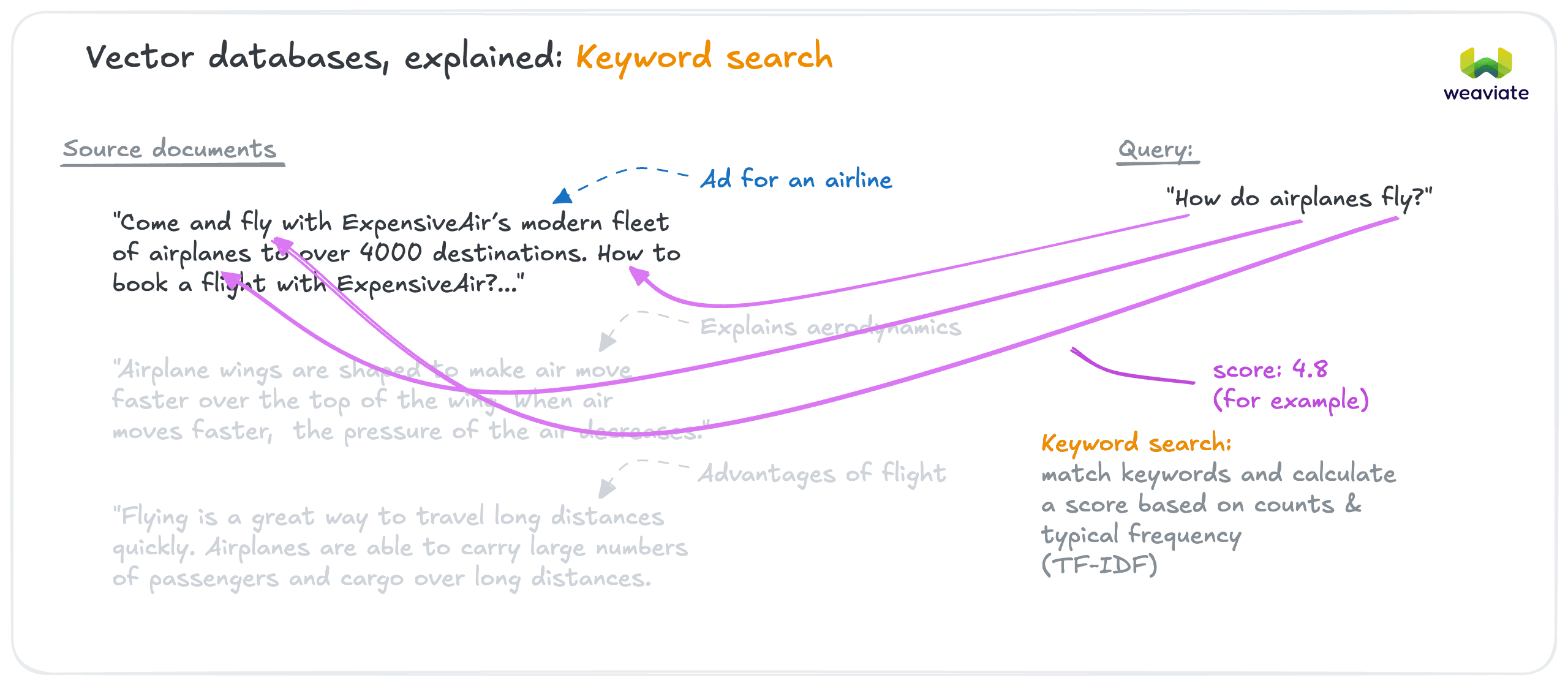
Keyword search uses a traditional text matching algorithm (BM25) for exact term matching.
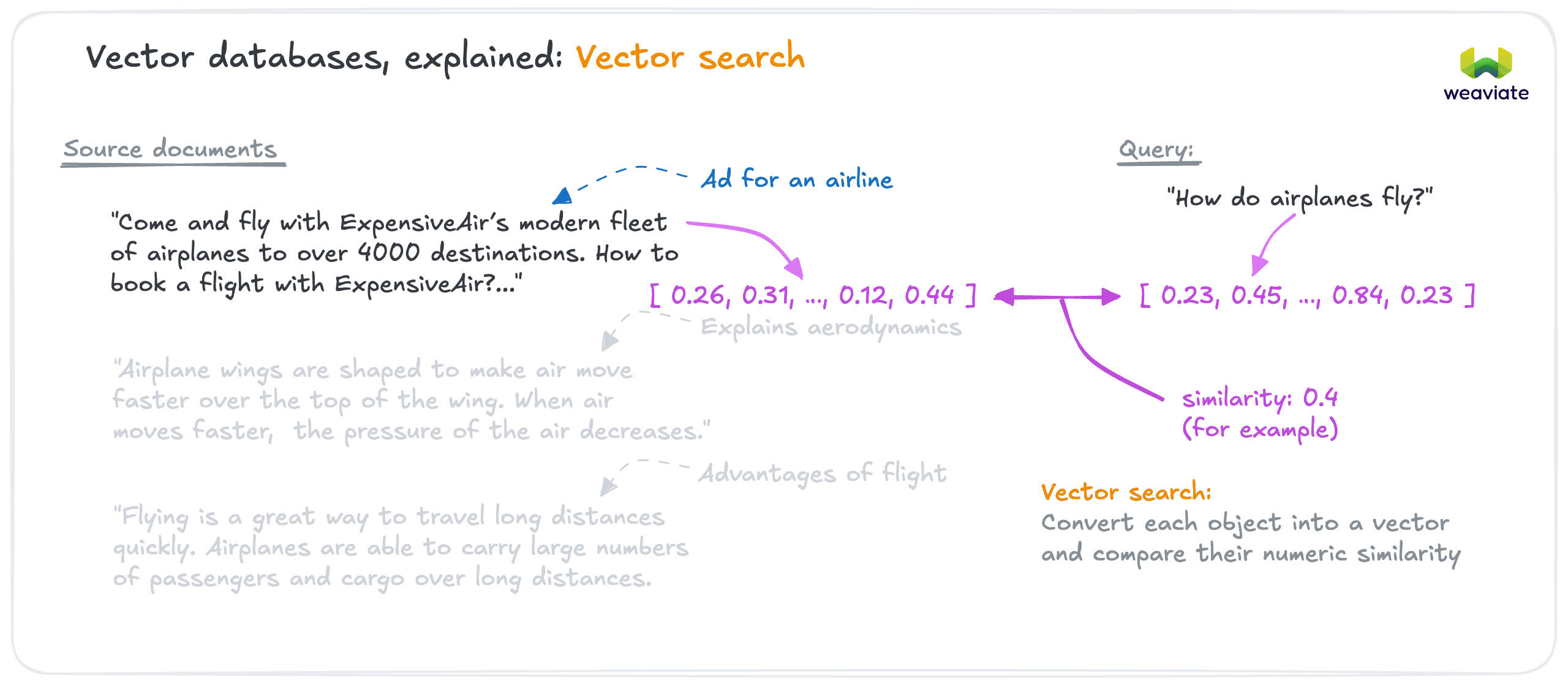
Vector search (also called semantic search) identifies similar objects by their meaning, using vector similarity.
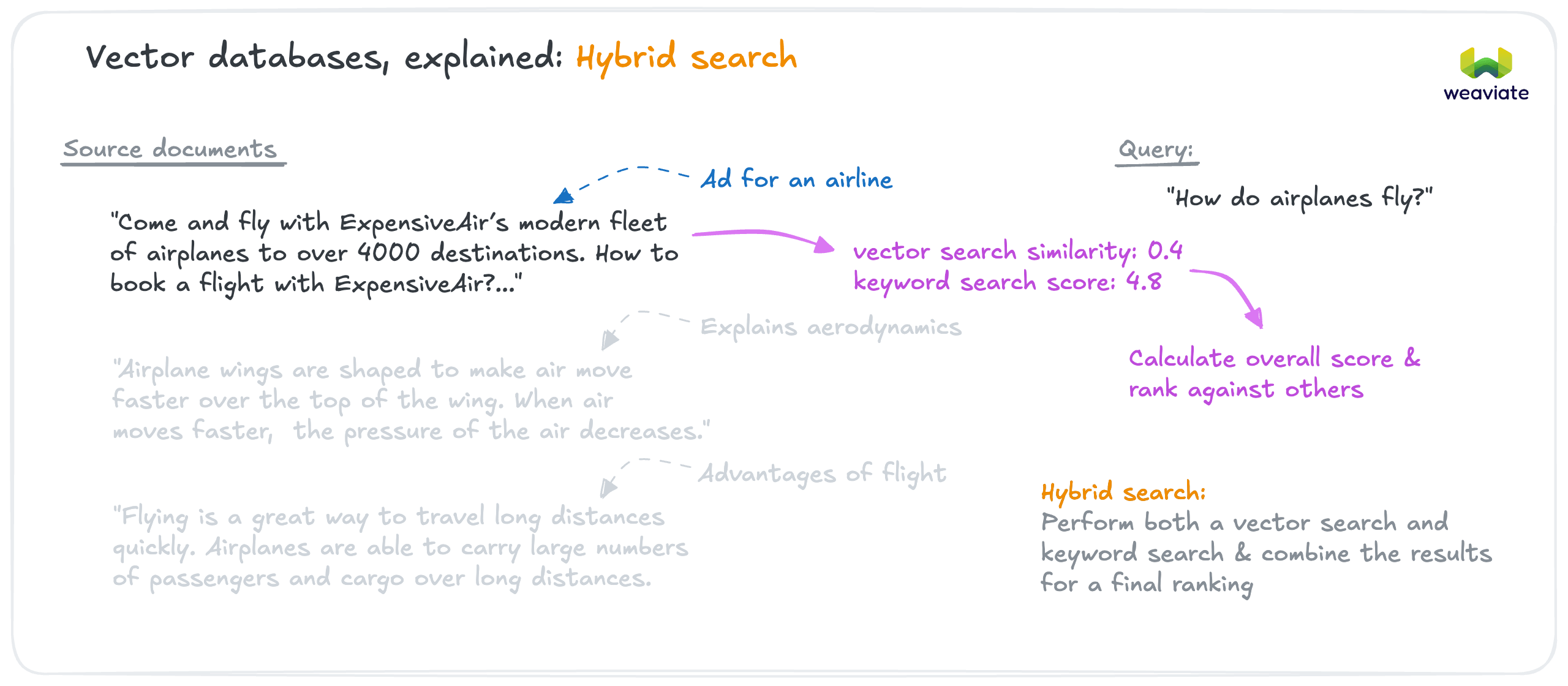
Now that we have our data, let's compare how vector, keyword, and hybrid search handle the same queries to understand their different behaviors.
Instantiate the collection object
import weaviate
import os

client = weaviate.connect_to_weaviate_cloud(
    cluster_url=os.getenv("WEAVIATE_URL"),  # Replace with your Weaviate Cloud URL
    auth_credentials=os.getenv("WEAVIATE_API_KEY")
)

movies = client.collections.use("Movies")

We'll use the collection object to perform the searches.
Define a function to compare search types
Here, we set up a function to compare all three search types.
from weaviate.collections import Collection
from weaviate.classes.query import MetadataQuery


def compare_search_types(collection: Collection, query: str):
    """
    Run the same query with vector, keyword, and hybrid search.
    Print results side-by-side for comparison.
    """

    # 1. Vector search (near_text)
    vector_results = collection.query.near_text(
        query=query,
        limit=5,
        target_vector="title",
        return_metadata=MetadataQuery(distance=True)
    )

    print(f"\nVector search results for: {query}:")
    for o in vector_results.objects:
        print(o.properties["title"], f"vector distance: {o.metadata.distance:.3f}")

    # Keyword search (BM25)
    keyword_results = collection.query.bm25(
        query=query,
        limit=5,
        query_properties=["title"],
        return_metadata=MetadataQuery(score=True)
    )

    print(f"\nKeyword search results for: {query}")
    for o in keyword_results.objects:
        print(o.properties["title"], f"score: {o.metadata.score:.3f}")

    # Hybrid search
    hybrid_results = collection.query.hybrid(
        query=query,
        limit=5,
        alpha=0.75,  # Set alpha explicitly; 0.75 is also the server default
        target_vector="title",
        query_properties=["title"],
        return_metadata=MetadataQuery(score=True)
    )

    print(f"\nHybrid search results for: {query}")
    for o in hybrid_results.objects:
        print(o.properties["title"], f"score: {o.metadata.score:.3f}")


# Test with each query
compare_search_types(movies, "Captain America")
compare_search_types(movies, "action")
compare_search_types(movies, "adventur")
compare_search_types(movies, "액션")

client.close()
Then it's called with different queries so we can observe how the results differ. Take a look at the results, and reflect on how the different search types perform.
These outputs come from one recorded run. Read them for the shape of each result set, not as constants to reproduce. Hybrid scores in particular depend on the alpha weighting, the fusion algorithm, and the whole candidate pool that fusion normalizes over, so your exact numbers will differ. The snippet above sets alpha=0.75 explicitly, which is what we recommend whenever the weighting matters.
Query 1: "Captain America" (exact title)
Vector search:
Captain America: The First Avenger    distance: 0.494
Captain America: Civil War            distance: 0.506
Captain America: The Winter Soldier   distance: 0.538
Captain Marvel                        distance: 0.592
The Avengers                          distance: 0.732
Keyword search:
Captain America: Civil War            score: 4.116
Captain America: The Winter Soldier   score: 3.675
Captain America: The First Avenger    score: 3.675
Captain Marvel                        score: 2.642
Hybrid search:
Captain America: Civil War            score: 0.974
Captain America: The First Avenger    score: 0.910
Captain America: The Winter Soldier   score: 0.820
Captain Marvel                        score: 0.500
The Avengers                          score: 0.215
Key insight: All three methods find the right movies. Hybrid combines both signals - "Civil War" wins because it scores well on both vector similarity AND keyword matching (fewer words means higher BM25 score).
Query 2: "action" (generic word)
Vector search:
Last Action Hero       distance: 0.705
Sister Act             distance: 0.782
Mission: Impossible    distance: 0.815
Inception              distance: 0.816
Mars Attacks!          distance: 0.824
Keyword search:
Last Action Hero score: 2.781
Hybrid search:
Last Action Hero       score: 1.000
Sister Act             score: 0.398
Mission: Impossible    score: 0.263
Inception              score: 0.262
Mars Attacks!          score: 0.230
Key insight: Keyword search only finds one movie (exact match). Vector search finds action movies semantically even without the word "action" in the title. Hybrid balances both - exact match gets boosted while still finding semantic matches.
Query 3: "adventur" (misspelling)
Vector search:
Avatar                                  distance: 0.806
The Avengers                            distance: 0.822
Monsters, Inc.                          distance: 0.836
Captain America: The First Avenger      distance: 0.842
Antz                                    distance: 0.843
Keyword search:
(no results)
Hybrid search:
Avatar                                  score: 0.700
The Avengers                            score: 0.609
Monsters, Inc.                          score: 0.532
Captain America: The First Avenger      score: 0.497
Antz                                    score: 0.495
Key insight: With the default word tokenization, keyword search fails on typos. It matches whole tokens, and "adventur" is not a token in the data. Vector search is robust here: the embedding model understands "adventur" ≈ "adventure". (Keyword search can be made typo-tolerant by indexing a property with trigram tokenization, which breaks text into overlapping 3-character sequences. That is a deliberate per-property choice, not the default.) Typo handling is critical for user-facing applications where typos are common.
Query 4: "액션" (Korean for "action")
Vector search:
Last Action Hero           distance: 0.688
Hot Shots!                 distance: 0.751
Kick-Ass                   distance: 0.752
Mars Attacks!              distance: 0.754
American History X         distance: 0.760
Keyword search:
(no results)
Hybrid search:
Last Action Hero           score: 0.700
Hot Shots!                 score: 0.376
Kick-Ass                   score: 0.369
Mars Attacks!              score: 0.355
American History X         score: 0.325
Key insight: Keyword search can't match across languages. Vector search works cross-lingually - the embedding model maps "액션" (Korean) ≈ "action" (English) to the same semantic space. Essential for multi-lingual applications.
Patterns and trade-offs
These examples illustrate that there is no single best search type. Each has its own strengths and weaknesses, meaning you must make trade-offs based on your specific use case.
Vector search
- ✅ Semantic/conceptual queries - "space action" finds sci-fi movies
- ✅ Typo tolerance - "adventur" still works
- ✅ Multi-lingual - Korean query finds English titles
- ✅ Multi-modal - image search, video search, audio search
- ✅ Broad matching - "action" finds action movies without that word
- ❌ Less predictable - "Sister Act" for "action" (semantically related, but unexpected)
Keyword search
- ✅ Exact matching - precise BM25 scoring for exact terms
- ✅ Predictable - you know why results match
- ✅ Transparent - easy to explain
- ❌ Sparse results - "action" returns only 1 movie
- ❌ No typo tolerance by default - "adventur" returns nothing under
wordtokenization (trigramtokenization can add fuzzy matching) - ❌ No semantic, multi-modal or multi-lingual understanding
Hybrid search
- ✅ Balanced - combines semantic + exact match
- ✅ Better coverage - more results than keyword alone
- ✅ Typo tolerant - inherits from vector component
- ✅ Exact match boosting - still rewards precision
- ✅ Most versatile - handles all query types reasonably well
- ❌ Slower & higher load - requires both searches to be performed
Trade-off: Vector favors recall (finding related items), keyword favors precision (exact matches), hybrid balances both. This can be tuned via the alpha parameter (more on this later).
For most user-facing search applications, start with hybrid search. It provides resilience to different query types, typos, and user intent while still rewarding exact matches.
Now that you understand how each search type behaves, let's dive into details about each type.