Using Inference Providers
Up until this point of the module, we have been largely discussing theoretical aspects of AI models. Hopefully, this has helped you to develop, or solidify, a foundational understanding of these models.
But we have not forgotten that AI models are more than just impressive scientific advancements. They are tools for us to use so that we can be more productive. Let's now take that understanding and start to translate it to practical usage.
In this section, we begin to show examples of AI model usage. Once a model is built, the step of using, or running, a model to produce outputs is also called "performing inference".
Inference: The basics
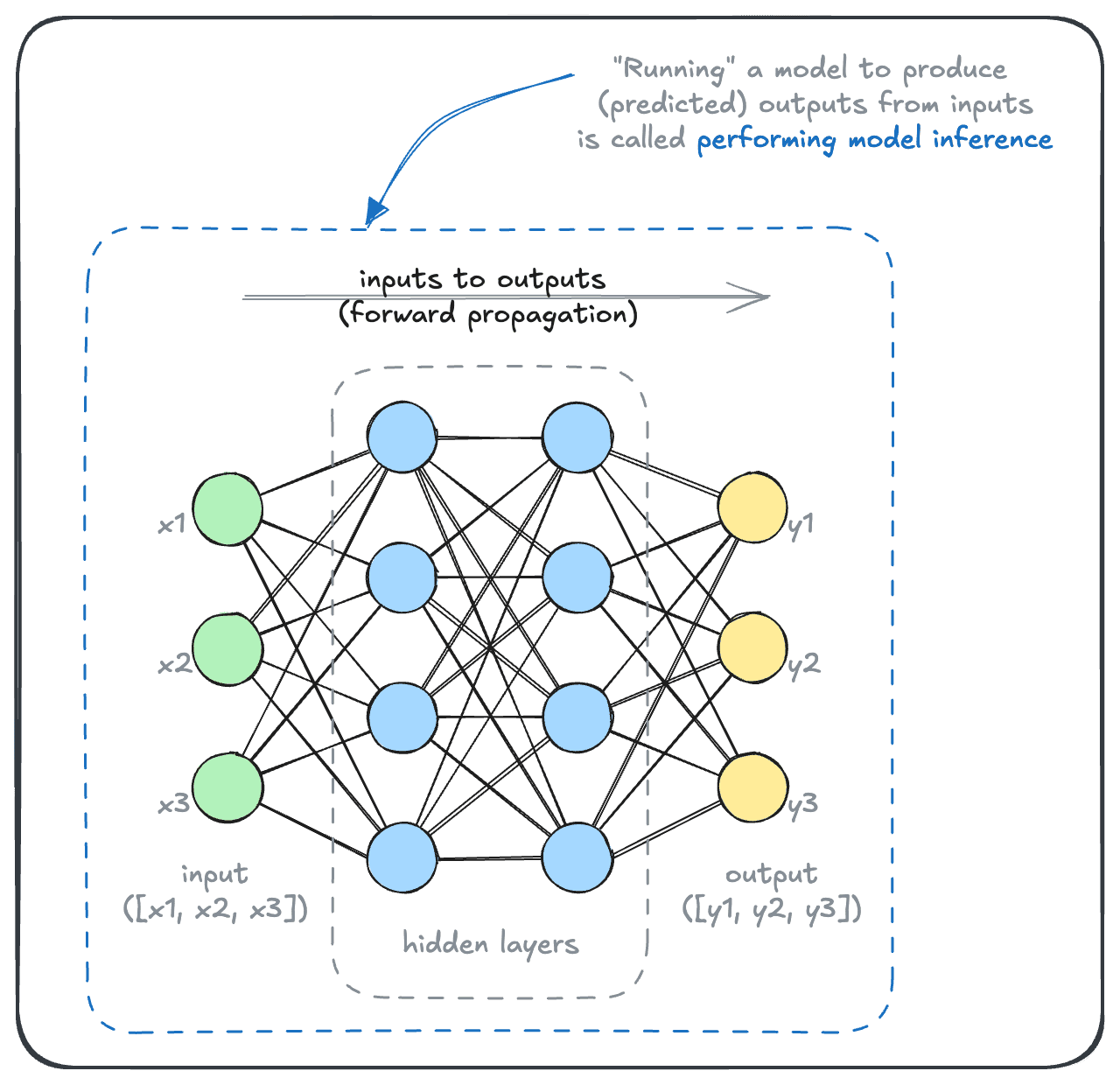
The available model inference options can be quite extensive, from the inference modality to the model provider and model itself. As a result, the permutations of possible decisions can easily be overwhelming.
So, this section is designed to give you an organized overview of popular choices.
First we will cover different ways or modes of using these models - whether to use an inference provider, or perform local inference. Then, within each mode, we will show some examples of performing inference through popular providers or software libraries.
This should remove some of the intimidation and mystique from the range of options, and set the ground work for Embedding Model Evaluation & Selection, which turns these choices into a repeatable evaluation workflow.
You may already know that Weaviate integrates with model providers to make inference easier. In this section, however, we will access the model ourselves. This will help you to understand what is going on under-the-hood when Weaviate performs inference on your behalf later on.
Inference via service providers
The lowest-friction method for accessing modern AI models is to use a web API provided by an inference service provider.
Thanks to the explosion of popularity for certain types of AI models, there are numerous inference providers (and APIs) available that almost anyone can sign up and use.
Popular inference providers include Anthropic, AWS, Cohere, Google, Microsoft, OpenAI, and many, many more.
Not all models are available at all inference providers. Some inference providers also develop their own, proprietary models, while others specialize in simply providing an inference service.
Let's take a look at examples of performing inference through Cohere.
Cohere has offered rate-limited API access at no charge, but free-tier terms are set by Cohere, not by us, and they change without notice. Check Cohere's current pricing rather than trusting this page. If you do end up on a paid tier, the volume of inference in these sections is very small and the cost will be too (well under US$1).
Preparation
For this section, we will use Cohere. Cohere develops a range of generative, embedding and re-ranker models. Cohere's models are available through other inference services, as well as Cohere itself. Here, we will use the Cohere API directly.
Cohere's dashboard distinguishes trial keys from production keys. These examples are written for a trial key, which has historically been free but rate-limited. Confirm the current terms on Cohere's site. The code below is unaffected either way. Only the key you supply changes.
To use the Cohere API, sign up for an account, and then navigate to their dashboard. There, you should be able to navigate to a section for API keys, where you can manage your API keys.
Create a trial key, which should be sufficient for this usage. Set the API key as an environment variable, with the name COHERE_API_KEY.
Install the Cohere SDK with your preferred environment with your preferred package manager. For example:
pip install cohere
Embedding model usage
The following snippet will convert a series of text snippets (source_texts) into embeddings:
import cohere
import os

cohere_api_key = os.getenv("COHERE_API_KEY")
co = cohere.ClientV2(api_key=cohere_api_key)

source_texts = [
    "You're a wizard, Harry.",
    "Space, the final frontier.",
    "I'm going to make him an offer he can't refuse.",
]

response = co.embed(
    texts=source_texts,
    model="embed-english-light-v3.0",
    input_type="search_document",
    embedding_types=["float"],
)

source_embeddings = []
for e in response.embeddings.float_:
    print(len(e))                   # This will be the length of the embedding vector
    print(e[:5])                    # This will print the first 5 elements of the embedding vector
    source_embeddings.append(e)     # Save the embedding for later use
Note that for saving source texts to search though later on, we specify the input type search_document here.
This should output something like this (note the exact numbers may vary):
384
[0.024459839, 0.039001465, -0.013053894, 0.016342163, -0.049926758]
384
[-0.0051002502, 0.017578125, -0.0256958, 0.023513794, 0.018493652]
384
[-0.076660156, 0.04244995, -0.07366943, 0.0019054413, -0.007736206]
Printing for each vector its length (dimensionality) and the first few dimensions.
Then, to find the piece of text that best matches a query (let's say: intergalactic voyage), we would first embed the query text:
# Get the query embedding:
query_text = "Intergalactic voyage"

response = co.embed(
    texts=[query_text],
    model="embed-english-light-v3.0",
    input_type="search_query",
    embedding_types=["float"],
)

query_embedding = response.embeddings.float_[0]

print(len(query_embedding))
print(query_embedding[:5])
This should produce:
384
[-0.007019043, -0.097839355, 0.023117065, 0.0049324036, 0.047027588]
Indicating that our query vector is the same dimensionality as the document vector, and that each dimension has a similar format.
To perform a vector search:
# Find the most similar source text to the query:
import numpy as np

# Calculate the dot product between the query embedding and each source embedding
dot_products = [np.dot(query_embedding, e) for e in source_embeddings]

# Find the index of the maximum dot product
most_similar_index = np.argmax(dot_products)

# Get the most similar source text
most_similar_text = source_texts[most_similar_index]

print(f"The most similar text to '{query_text}' is:")
print(most_similar_text)
This should produce the output:
The most similar text to 'Intergalactic voyage' is:
Space, the final frontier.
Hopefully, you will agree that this makes good intuitive sense. If you are curious, try varying the source texts, and/or the query texts.
The embedding model does its best to capture meaning, but it isn't perfect. A particular embedding model will work better with particular domains or languages.
Generative model usage
Now, let's use one of Cohere's large language models. We will ask it to explain how a large language model works:
import cohere
import os

cohere_api_key = os.getenv("COHERE_API_KEY")
co = cohere.ClientV2(api_key=cohere_api_key)

messages = [
    {
        "role": "user",
        "content": "Hi there. Please explain how language models work, in just a sentence or two.",
    }
]

response = co.chat(
    model="command-a-03-2025",
    messages=messages,
)

print(response.message.content[0].text)
The response may look something like this (note the exact output may vary):
Language models are artificial intelligence systems that generate and understand human language by analyzing vast amounts of text data and learning patterns, structures, and context to create responses or translations. These models use machine learning algorithms to create statistical representations of language, enabling them to produce human-like text output.
If you've seen a web interface such as Claude AI or ChatGPT, you would be familiar with multi-turn conversations.
In an API, you can achieve the same result by simply providing the preceding conversations to the LLM:
import cohere
import os

cohere_api_key = os.getenv("COHERE_API_KEY")
co = cohere.ClientV2(api_key=cohere_api_key)

messages = [
    {
        "role": "user",
        "content": "Hi there. Please explain how language models work, in just a sentence or two.",
    }
]

# Initial response from the model
response = co.chat(
    model="command-a-03-2025",
    messages=messages,
)

# Append the initial response to the messages
messages.append(
    {
        "role": "assistant",
        "content": response.message.content[0].text,
    }
)

# Provide a follow-up prompt
messages.append(
    {
        "role": "user",
        "content": "Ah, I see. Now, can you write that in a Haiku?",
    }
)

response = co.chat(
    model="command-a-03-2025",
    messages=messages,
)

# This response will take both the initial and follow-up prompts into account
print(response.message.content[0].text)
The response may look like this:
Language models, oh
Patterns and words, they dance
New text, probabilities.
Notice that because the entire message history was included, the language model correctly responded, using the message history as context.
This is quite similar to what happens in applications such as Claude AI or ChatGPT. As you type in your answers, the entire message history is being used to perform model inference.
You've seen how to use AI models through cloud-based APIs. Now let's explore the alternative approach - running these models locally on your own infrastructure for greater control and privacy.