Overview
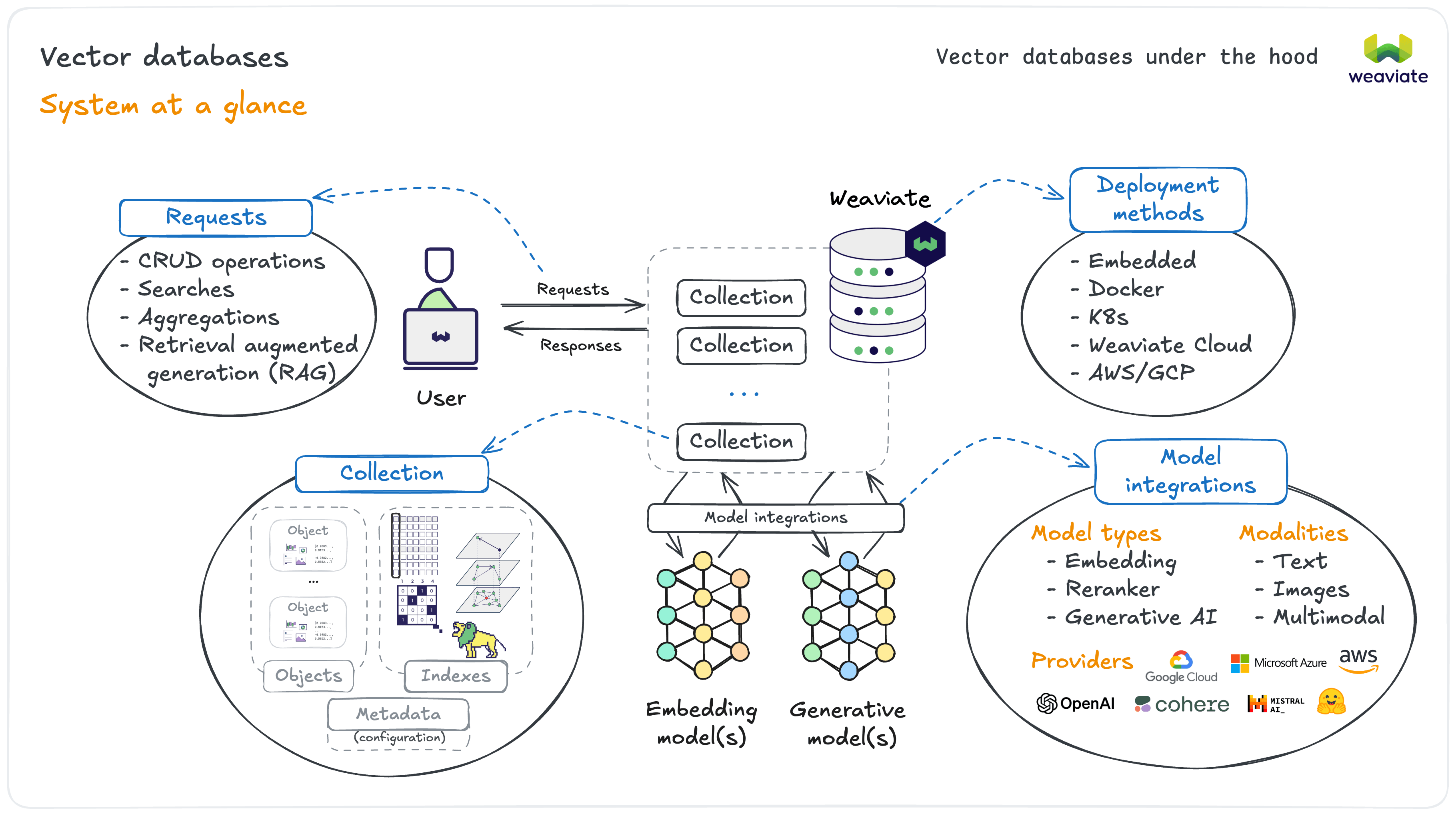
Weaviate connects several key components together at the system level:
- Users typically interact with Weaviate through language specific client libraries (Python, JavaScript, etc.)
- Weaviate supports a wide range of operations, directed at a collection or a cluster
- Each collection provides an isolated set of objects with its own configurations
- Embedding and generative AI models are integrated for convenient usage
- There is a variety of deployment options, both open-source or managed, as well as local or cloud-based
Weaviate can be used with all of the following:
- Model types: Embedding models (for creating vectors), rerankers (for result optimization), and generative AI (for text generation)
- Modalities: Support for text, images, and multimodal data processing
- Providers: Weaviate's own first-party Weaviate Embeddings, plus integrations with leading third-party providers (AWS, Cohere, Google, Hugging Face, Jina AI, Mistral, NVIDIA, OpenAI, Voyage AI and more), as well as local models and the flexibility to bring your own vectors
- Deployment options: Docker, Kubernetes, Weaviate Cloud, the AWS and GCP marketplaces, DigitalOcean Managed Weaviate (public preview), Snowflake Snowpark Container Services, and Embedded Weaviate (experimental, launched by the client itself). See How to install Weaviate
This architecture means as a developer, you get to enjoy superior experiences whether it is for changing deployments, or using AI models.
Developer experience
One of our focuses at Weaviate is to provide a great developer experience across the board. Integrating AI models in Weaviate is a key example of this.
To use a specific embedding model (e.g. OpenAI), you simply specify the provider & model details in your collection configuration - no need to manage API calls, rate limits, or vector generation yourself.
# Weaviate calls the OpenAI API on your behalf, so it needs your credential.
# Supply it as a request header when you connect:
client = weaviate.connect_to_local(
    headers={"X-OpenAI-Api-Key": os.environ["OPENAI_API_KEY"]}
)

# From there, the model integration is just part of the collection definition.
# You never call the embedding API yourself.
client.collections.create(
    "Movies",
    vector_config=Configure.Vectors.text2vec_openai(),
)
When you add movie data, Weaviate automatically generates vectors using OpenAI's models. When you search, it vectorizes your query using the same model for consistency.
Weaviate, not your application, is the thing calling OpenAI. So the credential has to reach Weaviate. There are two ways to get it there:
- Per request, from the client (shown above): pass the
X-OpenAI-Api-Keyheader when you connect. In the example this is read from anOPENAI_API_KEYvariable in your environment, but the name on your side is entirely your choice, because only the header name matters to Weaviate. - Once, on the server: set the
OPENAI_APIKEYenvironment variable on the Weaviate instance itself. Note the spelling. It isOPENAI_APIKEY, with no underscore betweenAPIandKEY. Other providers follow the same pattern (COHERE_APIKEY,HUGGINGFACE_APIKEY, and so on).
Similar integrations exist for generative models and reranker models. These types of features let you focus on building your application, not managing AI infrastructure.
Agents
Model integrations still leave you writing the search. Weaviate also offers a higher-level, agentic layer that does not.
The Query Agent is a managed service in Weaviate Cloud that takes a plain-language question, works out which collections to search and which filters and aggregations to apply, runs those queries against your data, and returns an answer grounded in the results. You describe the question — the agent composes the query.
It is worth knowing this layer exists even at this stage, because it changes what "using Weaviate" can mean: for some applications you never hand-write a search at all. The Query Agent runs in Weaviate Cloud only. It is not part of a self-hosted deployment.
- Docs: Query Agent | Query Agent quickstart
Applications
While search, or retrieval, is a primary feature, Weaviate powers much more than that. Its vector-first approach helps power AI-native applications, including:
- Retrieval augmented generation (RAG) combines retrieval with a generative model to produce outputs grounded in your specific, up-to-date data.
- Recommendation systems can suggest products, content, or connections based on semantic similarity rather than just categorical matching.
- Question answering and chatbot systems can retrieve relevant context to provide more accurate, contextual responses.
- Image and multimodal applications can find visually similar products or match images to text descriptions.
- Content classification and moderation systems can automatically categorize documents, detect inappropriate content, or organize large datasets by meaning.
- Anomaly detection applications can identify unusual patterns in data by finding items that are semantically distant from normal examples.
The common thread across all these applications is Weaviate's ability to work with meaning. This makes Weaviate the perfect AI-native tool for AI-powered applications that work with similarity, relevance, or semantic understanding.
What's next?
Now that you understand these core concepts, you're ready to get hands-on. The next courses in Weaviate Academy will guide you through different levels of building with Weaviate.
The next courses range from short hands-on tutorials to deeper dives, where each one will level you up in a different way.
We'll look at everything from AI model selection to building complete applications, and eventually master advanced topics like performance optimization and multi-tenant collections.
By the end, you'll be ready to build production-ready AI applications with Weaviate.